

Topics and the inbox
In a harness’s own chat, everything arrives in one stream: tool output, progress notes, the agent’s reasoning, and somewhere among them the one question that needs you. With five sessions running, that is five streams, and the important comment scrolls away while you read another.
cland sorts the stream by what each message is and whom it concerns:
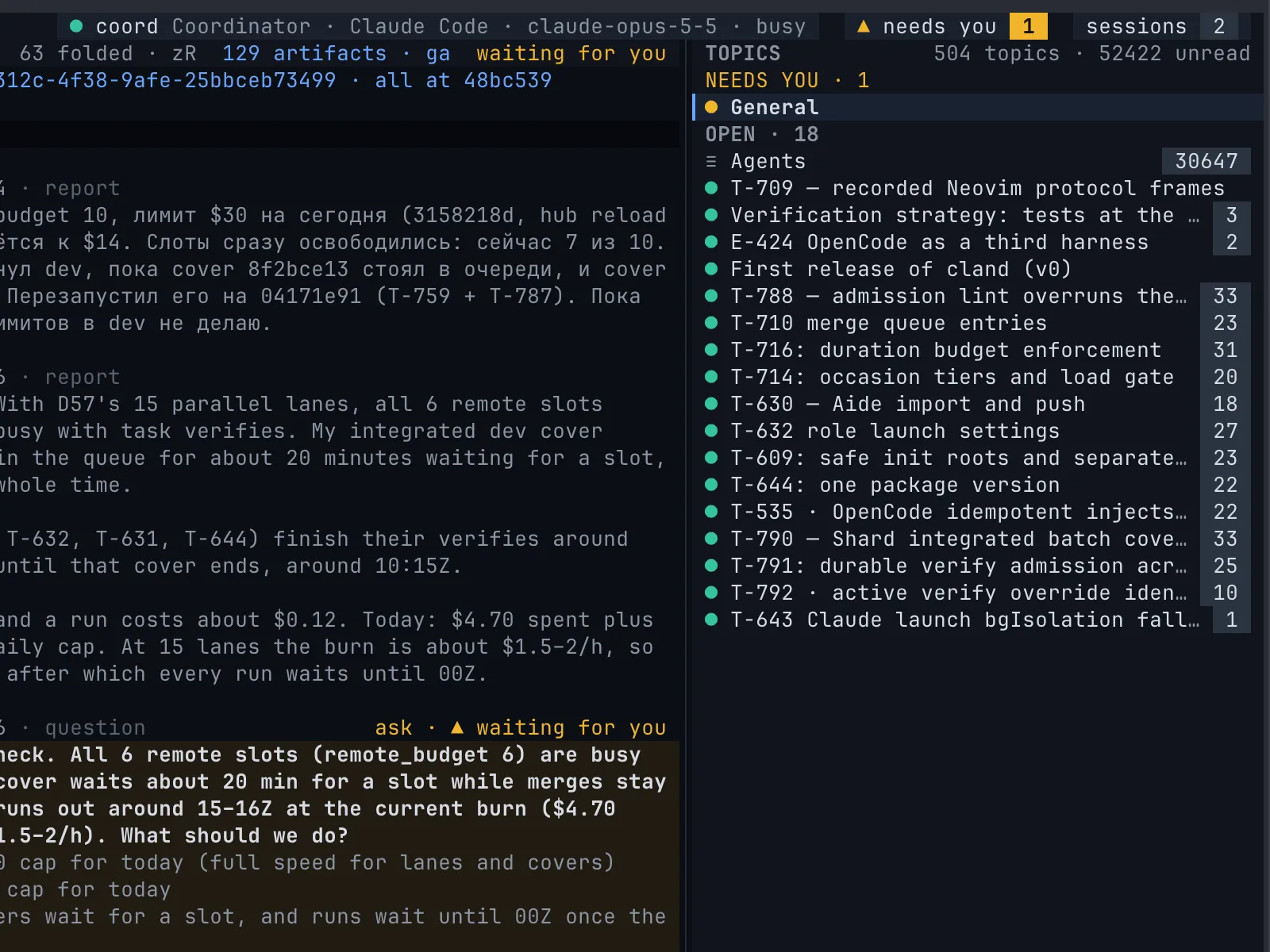
- Topics. You talk to the Coordinator in topics, each bound to one unit of work, each with a status that says who is waited on.
- General is the standing topic for everything else.
- The Agents topic. Agent-to-agent traffic and session lifecycle events go to a read-only record of their own. In your topics, runs of it fold into one line.
- Asks. Questions travel up the chain of leads, and only the Coordinator asks you.
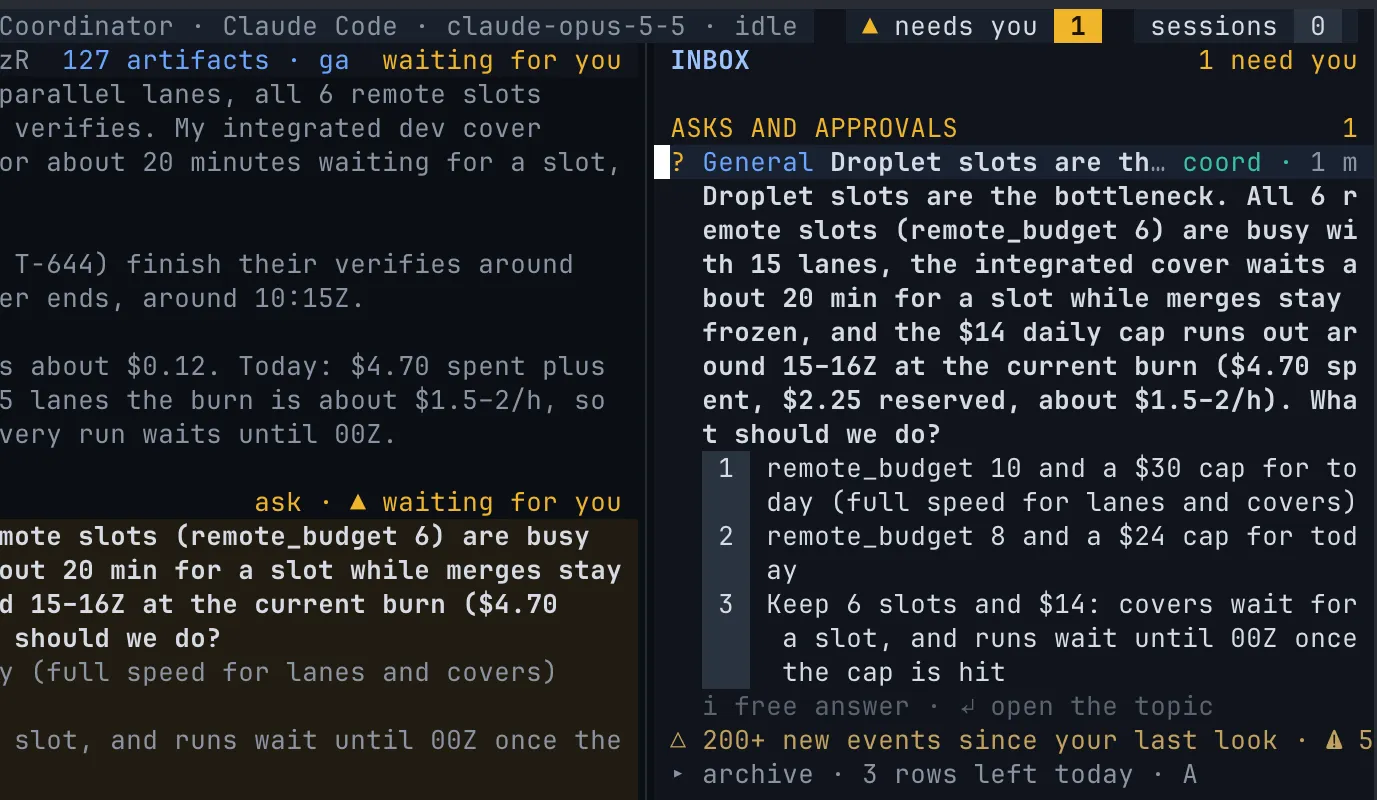
- The inbox holds only what needs you now: asks, approvals, plans, requests and messages to you.
- Layers decide what demands your attention and what waits behind a fold.
The raw stream is still there when you want it: every session’s own harness is one key away.
Topics
Section titled “Topics”A topic is a thread in your chat with the crew. It has a title, a status and at most one bound unit of work: an item.
| Status | Means |
|---|---|
open |
Nobody is waited on. |
waiting for human |
You are: an ask, or a message to you, is open. |
waiting for agent |
A session is: it owes an answer or a report. |
closed |
Done. Closing the bound item closes its topic. |
- Messages go to the Coordinator unless you mention someone:
@reviewer,@qaor a session name such as@impl-42. A mentioned session may answer you in that topic. - An item can have its own topic. The crew opens them, and
Mon an item in the explorer opens one for you. The item’s review requests, verdicts and reports land there, next to your words about it. - Artifacts a session shows you, a report, a diagram, a page, appear as chips in the topic they belong to. See Artifacts.
In the terminal workbench, ␣t opens the topics panel, grouped as needs you, open and closed, with unread badges; ␣T docks it above the inbox. In the panel, n creates a topic, c closes one and r resolves its wait. The composer sits under the thread: Enter sends, Shift+Enter adds a line, ␣P opens a full buffer for a long prompt.
In the web workbench, the Topics area lists what waits for you first, then the standing topics, General and Agents, set apart, then the topics of items, with the closed ones folded.
General
Section titled “General”General is the standing topic every project has, bound to no unit of work: your free conversation with the Coordinator. ␣g opens it. The onboarding leaves its welcome note here, and m on an item in the explorer sends your message here with the item’s context attached.
The Agents topic
Section titled “The Agents topic”The Agents topic is the standing, read-only record of agent-to-agent messages and of the lifecycle of sessions and roles: launches, stops, role changes. ␣L opens it. Read it when you want to know how the crew got somewhere; ignore it the rest of the time.
Inside your topics, a run of agent-to-agent messages folds into one line, built by the hub from facts: who, how many messages, the latest step, the age, for example impl-42 → rev-1 · 4 messages. Asks, verdicts, answers and anything to or from you never fold. Open a fold with zo or Enter in the terminal; in the browser it opens in place.
An ask is a decision question: numbered options and room for a free answer. Asks travel up the chain of leads, and each lead answers what it can:
- Only the Coordinator asks you. Implementers, Reviewers, QA and Leads never do. A question reaches you once, from the one session that knows the whole project.
- An open ask keeps its topic waiting for whoever must answer it now.
- Answer with one key.
1to9picks an option;itypes a free answer. The same ask shows in the inbox and in its topic, in Neovim, the browser and the phone; the first answer from any of them wins. - Declining is an answer too. In the browser and on the phone, decline with a reason: the asker receives it and may ask again later.
From a shell, set ASK_ID to an open ask id printed by cland inbox:
cland inbox # what needs you, with ask idscland topic answer "$ASK_ID" 2 # pick option 2cland topic answer "$ASK_ID" --text "Ship it without the export"Requests
Section titled “Requests”A request asks you for an act rather than a decision: a review, a QA run, or taking over a role. It waits in the inbox until you answer, give the verdict or decline it. r replies to it; d declines it, and the sender is told.
The inbox
Section titled “The inbox”The inbox holds only what needs you now, in four sections:
- Asks and approvals: questions, and command approvals a harness waits on.
- Plan approvals: epic plans waiting for you, when you approve plans.
- Requests to you.
- Messages to you.
Each section shows its newest five and folds the rest into an “N more” line; every row shows how long it has waited. A row leaves when it is answered, approved, replied to or read. The needs you count in the top bar and in the browser tab’s title is the inbox count.
| Key | What it does |
|---|---|
␣n, ␣N |
Open the inbox, or open it full width. |
1–9, i |
Answer the selected ask with an option, or a free answer. |
Enter |
Open the ask’s topic, approval details (or attach for TUI-only approvals), or a plan. |
r |
Reply to a request or a message. |
d |
Decline a request, deny a relayed approval, or mark a message read. |
A |
What left the inbox in the last seven days, and why. |
With nothing waiting it says ✓ nothing needs you. On the phone the inbox is home, and an ask opens as a bottom sheet over the keyboard.
The events view
Section titled “The events view”Everything else, launches, merges, verdicts, verification results, usage warnings, goes to the events view, newest first, grouped by day. ␣E opens it; the line under the inbox counts what is new since your last look.
- In Neovim,
1to9filter session, task, verdict, suite, release, artifact, usage, topic and heartbeat events; rule events have a palette action. The browser has1to8for the first eight kinds.0shows all andwtoggles warnings. Enteropens the subject: a card, a session, a topic, an artifact.gMmutes the subject’s events.
Nothing still waiting in the inbox repeats here. Your last look and your read marks are kept by the hub, so the terminal, the browser and the phone agree on what you have seen.
Layers
Section titled “Layers”Everything the workbench shows sits in one of four layers:
| Layer | What sits there | How it shows |
|---|---|---|
| now | What needs you or changes your plan: messages to you, asks, approvals; waiting and busy sessions, and your Aides; the current release’s tasks in work. | Everywhere: the inbox, the needs you count, notifications. |
| watch | Worth seeing, can wait: the Coordinator’s reports, a clear verdict, a release, idle sessions, planned tasks. | One key away, or folded with a count. |
| background | Agent-to-agent traffic and bookkeeping. | The Agents topic, or behind a fold you open on purpose. |
| archive | Closed and old: messages older than seven days, closed releases, archived artifacts. | Only when you ask: the palette, an “all” filter, A. |
Agents raise something to now only by addressing you or asking you. There is no “important” flag for a model to set. Browser notifications fire only for the now layer, and never while you are looking at the page.